
The official trade tracker for Jailbreak
JB Trade Tracker
Find the best Jailbreak trading servers instantly.
Hunting for a server with the car or item you want is a pain — hopping in and out for hours. JB Trade Tracker just pulls them up for you, so you jump straight into the right one.
See for yourself
Here's the extension running end to end, unedited. Watch it before you install anything.
No account, no login
It never asks for your Roblox login, password, or cookies. There's nothing to steal.
Uses Roblox's own server list
Data comes straight from Roblox's public server API — no fake data, no fabricated claims.
Only runs on Jailbreak pages
Chrome shows "No access needed" on other sites — it can’t read or change anything else you browse.
Off by default
The extension does nothing until you flip the toggle on yourself. You're always in control.
Chrome flags unpacked extensions as "developer mode" installs — that's a browser warning about how it was installed, not about JB Trade Tracker itself. It disappears once the Chrome Web Store listing goes live.
What it does
Built for traders who don't want to waste time.
Find High-Value Servers
Instantly spot servers stocked with rare and high-tier items worth trading for.
Real-Time Item Scanning
Live scans of active trading servers so you always see what's actually there right now.
Instant Server List
No refreshing, no guessing — a live list of the best servers ready to join.
Filter By Car & Join
Filter for the exact cars you want and jump straight into a server that has them.
How it works
Download the Extension
Grab the .zip from the download button above.
Add to Chrome
Load the unpacked folder in your browser — takes 30 seconds.
Start Scanning Servers
Open the extension, filter what you want, and join.
Install the extension
Two options — pick either.
Install from Chrome Web Store
The cleanest install — one click, auto-updates. Coming soon.
Install manually (right now)
Works in Chrome, Edge, Brave, and any Chromium browser. Takes about a minute.
Guided install
Step 1 of 9 · about 2 min left of 2 min total
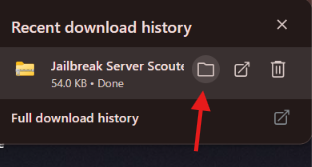
Open the downloaded file
5sClick the folder icon next to "Jailbreak Trade Tracker" in your download bar.
That opens your Downloads folder with the .zip already selected.
Tip: use ← / → arrow keys · click any screenshot to enlarge